HLK-LD2454 – Looking for latest firmware / firmware recovery

Viewed 56

Hello,

I have an HLK-LD2454 module that still outputs normal target tracking data via UART, but the configuration interface no longer works correctly.

The module responds to configuration commands, but always returns a failure status (01 00), including when trying to enter configuration mode. Commands such as firmware query, restart and factory reset also fail.

I have already tested the module directly with a USB-to-UART adapter, so the problem does not appear to be related to my ESP32 implementation.

I would therefore like to try reflashing/recovering the firmware using the official LD2454 upgrade/IAP tool.

Could you please provide the latest firmware file for the HLK-LD2454 and, if necessary, instructions for flashing/recovering the module?

If different hardware revisions require different firmware, I can provide photos and information from my module.

Thank you very much!

5 Answers

Thank you very much. This is very helpful.

I would like to try the hardware recovery via the J2 interface.

Could you please specify which programmer/debug adapter is required for the LD2454 J2 CLK/DIO interface?

For example, is J2 compatible with SWD and an ST-Link programmer, or does the LD2454 require a specific Hi-Link programmer/interface?

Could you also provide the exact name/version of the IAP tool and firmware file that should be used for hardware recovery of the LD2454?

I would like to avoid connecting an incompatible programmer to the J2 interface.

Thank you!

Hello Sun, pls help to check following,sincerely waiting for your updates:

  1. does the configuration interface not work refer to no response from the upper computer or no response when sending instructions. If there is no response when sending instructions, did you first send the enable configuration when modifying or setting parameters? If there is no response after sending, or if the data has been replied without stopping, try sending continuously.
  2. If the enable configuration command is sent and returns a failure message 01 00, check if the command is incorrect
  3. To burn firmware, a specialized burner is required and ST Link cannot be used for burning

Hello,

thank you for checking this.

The UART communication itself works normally. The LD2454 continuously outputs valid target tracking frames.

Before sending any configuration command, I send the Enable Configuration command:

FD FC FB FA 04 00 FF 00 01 00 04 03 02 01

The module does respond to this command, so there is no communication timeout. However, the ACK contains failure status 01 00 instead of success status 00 00.

I have tested this directly via USB-UART as well, independently of my ESP32/ESPHome implementation.

I will also try your suggestion of sending the Enable Configuration command continuously/repeatedly while the module is outputting tracking data and report the result.

Thank you also for confirming that ST-Link cannot be used for firmware recovery. Since a specialized programmer is required, I would first like to exhaust the UART/configuration possibilities before considering hardware recovery.

Best regards,
André Marggraf

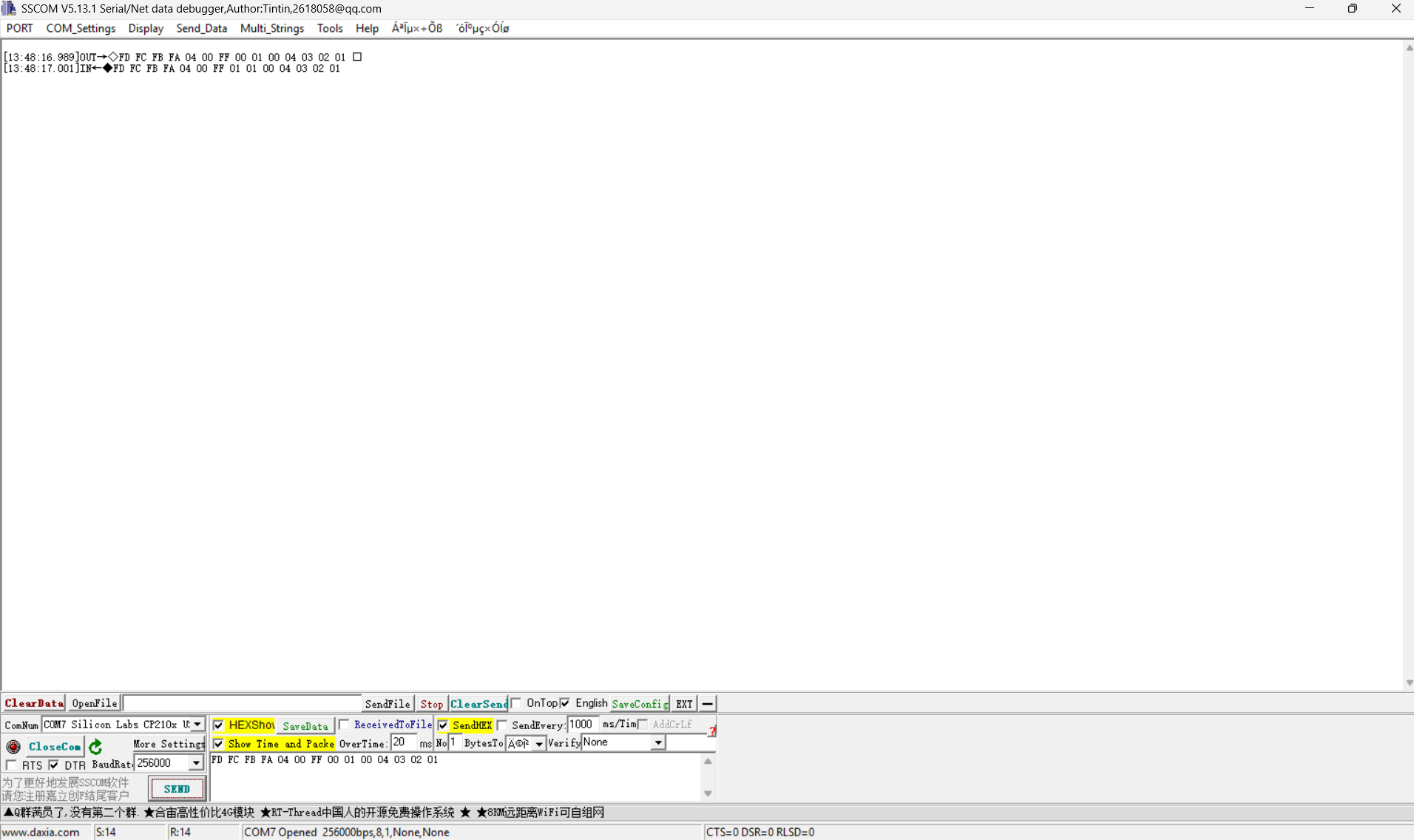
Could you please take a screenshot of the transmitted command for our analysis?
Also, does data transmission stop after you send this command: FD FC FB FA 04 00 FF 00 01 00 04 03 02 01?

Hello,

attached is a screenshot showing the exact command transmitted via USB-UART at 256000 baud.

TX:
FD FC FB FA 04 00 FF 00 01 00 04 03 02 01

The module responds approximately 12 ms later with:
FD FC FB FA 04 00 FF 01 01 00 04 03 02 01

So the module acknowledges the Enable Configuration command (FF 01), but returns status 01 00.

Regarding your second question: the module does not transmit tracking data even before the Enable Configuration command is sent. Therefore, data transmission does not stop as a result of this command — there is already no continuous tracking data after power-up.

The screenshot was taken with the module connected directly via a CP210x USB-UART adapter, without ESP32/ESPHome involved.

Best regards,
André

Screenshot 2026-09-20 134844.png